?review=1 and mark answers still to confirm. Each answer has a Copy link button for email replies.Modeller questions, answered
The questions NHS staff ask us most, in plain English. Can’t find yours? Email info@goldstonepenfintech.com — we read everything.
Your questions, answered
The answers to what you asked us are opened below. Everything else is further down the page.
Make these answers fit you
Five quick questions. Your answers set the bar at the top too, and you can change them there at any time.
Choose what applies to you in the bar above and the answers change to suit. “Opted out” means a gap in service or contributions since April 2022 (since 2015 in the 2008 Scheme).
No questions match that. Try a shorter word, or email us.
Getting started
Which modeller do I need?
Each tier builds on the one before:
- Bronze — your pension growth in the 1995, 2008 and 2015 schemes.
- Silver — whether you have an annual allowance charge, basic tapering and the £100,000 tax trap.
- Gold — advanced tapering, the cost of scheme pays, and your scheme pays election form filled in for you.
- Platinum — looks forward: partial or full retirement, lump sums, promotions, increments, salary sacrifice and changes in hours. Platinum always comes with concierge.
Add-ons
- PLUS (Silver and above, +£100) — upload your documents and PLUS reads them and fills in your modeller in seconds; refresh it whenever new documents arrive, with personalised video credits.
- Concierge (Silver and Gold +£150; included with Platinum) — our team builds your modeller for you and cross-checks your documents for errors.
- Concierge and PLUS together (+£250) — we build it, and you can keep it up to date and get your videos. Why most people choose both.
- Complex surcharge (£50) — concierge for a gap in service, an opt-out or a pension sharing order.
- Expert call (Silver and above, £250) — 30 minutes on Teams with a Forvis Mazars medical accountant.
- Extra video credits (£8 each, 4 for £24, 7 for £40) — more personalised videos for the scenarios you care about.
If you’re not sure, answer a few questions on Choose and it will recommend a tier and tell you why. Prices include VAT.
Do I need to register first?
Yes — register once and we’ll email you your own purchase page. If you registered for last year’s modeller you don’t need to register again: use the personal purchase link in our emails, or enter your email below and we’ll send it again.
I’ve paid but can’t find my modeller
Your links go to the email address you registered and bought with, so please check your spam or junk folder first. Or enter that address here and we’ll email you your links straight away:
If nothing arrives, you may have paid with a different address. Email us and we’ll match it up.
Which browser should I use? My data isn’t saving
Use Google Chrome on a computer (PC or Mac). It works best for the modeller, the Scenarios app and the document uploader. Safari can stop the uploader from working, and privacy or ad-blocking extensions can break the links the modeller uses to load your scenario. If something won’t save or open, try Chrome with extensions switched off.
What membership number do I enter?
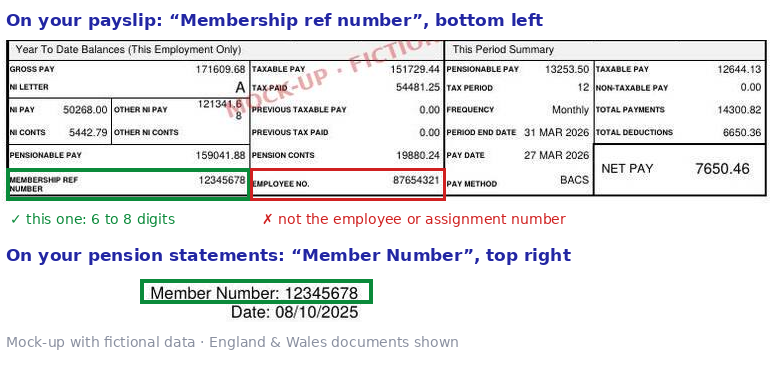
Your pension scheme membership number. On an NHS payslip it’s the “Membership ref number”, not your employee or assignment number; on your pension statements it’s the “Member Number”. It’s 6 to 8 digits with no letters — in Northern Ireland it’s often 6 digits. If you genuinely can’t find it, email us.
Can I see the modellers in action?
Yes. Our webinar with Andy Pow walks through the modellers on real-life examples, and the Forvis Mazars webinar covers the annual allowance and the expert calls.
Also: the Forvis Mazars webinar (26 October 2026), the lump sum video, and example personalised videos for each tier.
Can you tell me what I should do?
We can’t give financial or tax advice, and nothing on our site or in the modeller is advice. What the modeller does is let you see your own numbers and try out the options — working extra sessions, paying into a SIPP, reducing hours, retiring at different ages — so you can make your own decision or take it to your accountant or adviser. For a conversation about your numbers, see expert calls.
What the modeller covers
Which tax years does it cover?
The 2026/27 modellers cover 2024/25, 2025/26 and 2026/27. Platinum also looks forward to your retirement.
Your modeller carries on working for the tax years you’ve purchased. Each year we produce a new modeller for purchase that adds the current tax year, and all your data is automatically migrated to the new modeller when you buy it.
Does it cover the McCloud remedy years (2015 to 2022) or my RPSS?
No. The modellers start after the remedy period, so 2015 to 2022 is taken as already settled from your RPSS.
Checking or acting on your RPSS is a separate service, which we run with our partners Forvis Mazars. You can get its cost back in full through the remedy cost claimback scheme, so the service is essentially free to you. Find out more about the RPSS service.
Contingent decisions (for example buying back service) will be a separate product later in the tax year. Until then you can increase your legacy service in the modeller to see the effect on your annual allowance from 2023/24 onwards.
How much can I pay into a SIPP without a charge? What about carry forward?
Silver works out your pension growth against the annual allowance for each year, including tapering, so you can see how much allowance you have left, including any carried forward from the three previous years, which it works out for you (no need to enter carry forward yourself). With Silver PLUS, your personalised video also talks through SIPP costs on your own numbers.
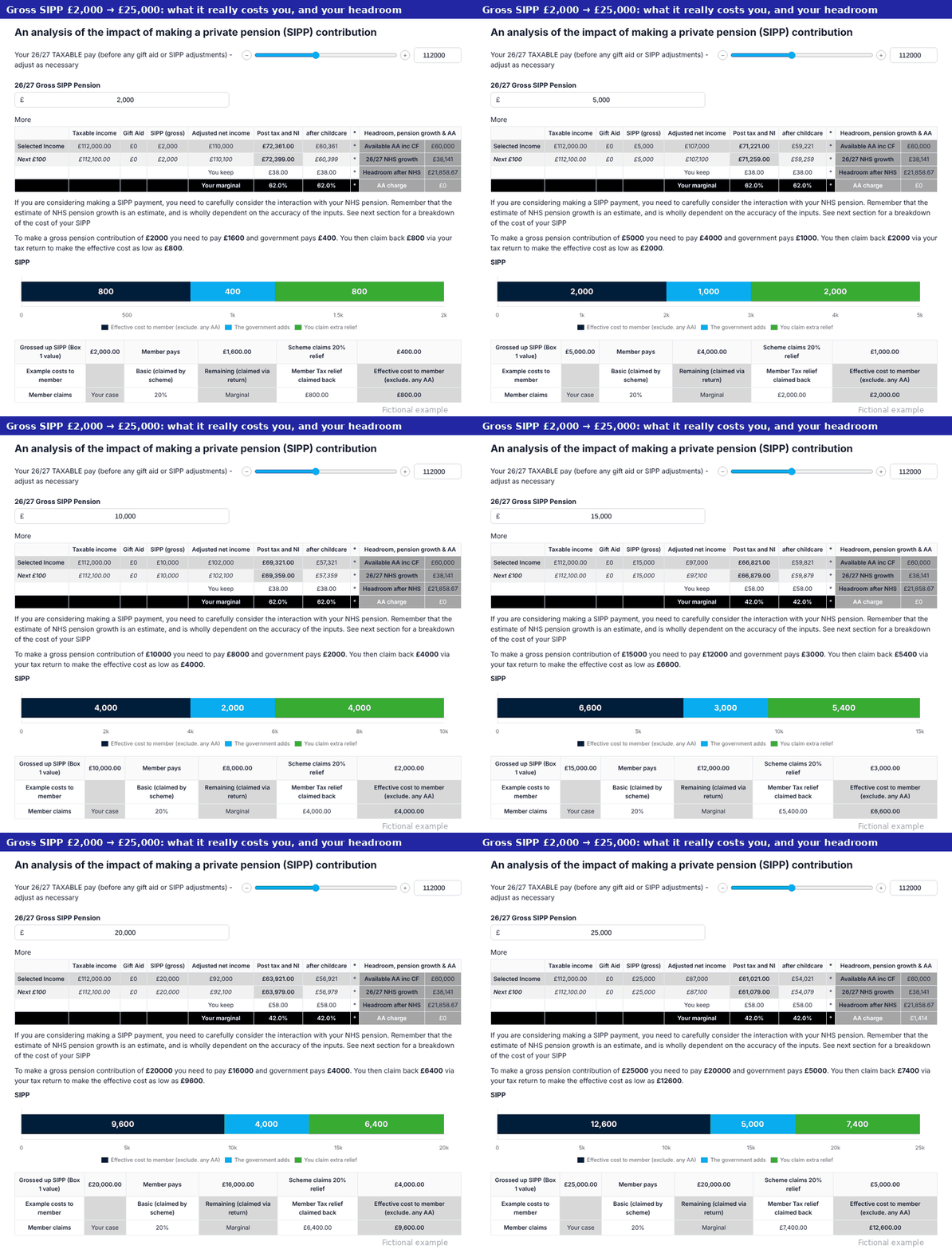
The modeller shows you the numbers; whether and how much to pay in is your decision, ideally with your accountant or adviser.
Do I need to enter carry forward myself, or use HMRC’s carry forward calculator?
No. In the 2025/26 modellers you had to work out carry forward from the remedy (RPSS) period with HMRC’s calculator and enter it yourself. The 2026/27 modeller works it out automatically from the data you give it: your pension growth for 2022/23 and earlier years (from your RPSS or pension savings statements) and, if you are tapered, your income figures. This gives the same figures as HMRC’s calculator.
If you don’t have an RPSS or the earlier pension savings statements, the modeller cautiously assumes there is no carry forward from those years.
Can it help with the £100,000 tax trap and tax-free childcare?
Yes. Silver shows your adjusted net income against the £100,000 threshold, where you lose your personal allowance and tax-free childcare. You can then try the effect of pension contributions or salary sacrifice.
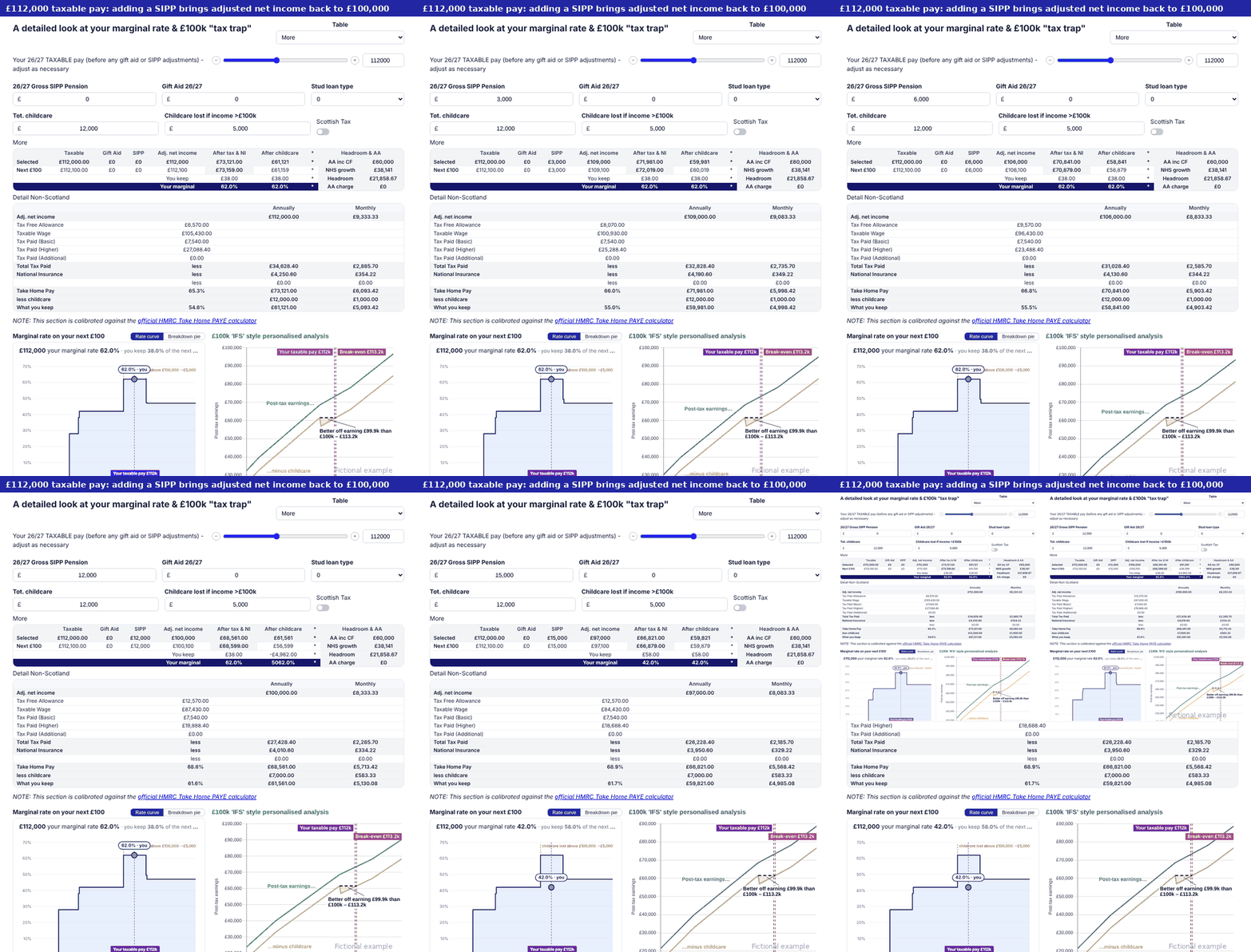
Can I model retirement, partial retirement, lump sums or dropping sessions?
That’s Platinum. Enter your retirement ages and choose the standard lump sum, the maximum, or any amount in between. You can also model future increments, promotions, salary sacrifice (a lease car, for example) and changing your hours before retirement.
Platinum PLUS adds the lump sum break-even analysis.
I work less than full time, or my hours changed. Will it work for me?
Yes. Silver works out your average whole-time equivalent for the current year if your hours changed part way through, and Platinum lets you set different hours in the future. Breaks in service are different — see the next question.
I’ve had a gap in service, opted out, or have a pension sharing order
If you’re a GP, a gap in service or contributions since April 2022 (or since 2015 in the 2008 Scheme), an opt-out or a pension sharing order needs concierge. Concierge for GPs isn’t available to buy yet: it opens towards the end of the 2026/27 tax year, when it will accommodate gaps, and we’ll let you know as soon as it opens for purchase. In the meantime you can use the self-service modeller and PLUS, but with a gap the growth figures won’t be accurate, so any self-service use is at your own risk.
For officers, these need our complex concierge service, which has a £50 surcharge. It is for:
- a gap in service or in contributions since April 2022 (or since 2015 for 2008 Scheme members);
- a gap in service or in contributions since 2015 — for the 2008 Scheme it’s since 2015 rather than April 2022, because your reckonable pay looks back 10 years;
- a pension sharing order on divorce.
With a gap since April 2022 the standard self-service modeller won’t give accurate growth figures, so any self-service use is at your own risk. Complex concierge is the accurate route.
You don’t need to work out whether you’re complex. Buy concierge and upload your documents, and we’ll tell you if your case is complex and send a link for the surcharge.
I’ve retired, I’m retiring, or I’m a GP
Routine and complex concierge don’t cover GPs or members who have retired or will retire in 2026/27. Our bespoke concierge for these cases opens towards the end of the 2026/27 tax year.
Routine and complex concierge don’t cover GPs. Our bespoke concierge for GPs opens towards the end of the 2026/27 tax year.
Routine and complex concierge don’t cover GPs or members who have retired or will retire in 2026/27. Our bespoke concierge for these cases opens towards the end of the 2026/27 tax year.
Routine and complex concierge don’t cover members who have retired (including partial retirement and retire and return) or will retire in 2026/27. Our bespoke concierge for these cases opens towards the end of the 2026/27 tax year.
If you’ve taken all your 1995/2008 benefits, you can use the self-service modeller now for your 2015-only position: enter no 1995/2008 service and include your pension income in your taxable income.
If you’re retiring in 2026/27, the self-service modeller works for previous tax years but not the 2026/27 figures, because different rules apply in the year you retire.
GPs can use the self-service modellers now. PLUS works for GPs and retired members too: it reads your Total Reward Statement (or the annual benefit statement from My NHS Pension)ABS-RSS from SPPAHSC Annual Benefit Statement, your pension savings statements, RPSS, scheme pays documents and HMRC documents, as well as practitioner dynamising sheets. Your document list.
I have added years. Are they included?
Yes. Added years come from your 05 service extractCPR export spreadsheets, and concierge enters them for you. If you don’t have added years, the modeller should show 0 added days per year; the example figures in the helper box are only there to show how the calculation works.
ERRBO and bought additional pension (as opposed to added years) aren’t currently included — see what isn’t covered.
Does it work in Scotland and Northern Ireland?
Yes, for the NHS schemes in England and Wales, Scotland (SPPA) and Northern Ireland (HSC Pension Service). In Scotland your pension statement is the ABS-RSS; in Northern Ireland it’s the HSC Annual Benefit Statement. Gold fills in the right scheme pays form for your scheme.
PLUS and concierge opened for non-GP members in Northern Ireland on 12 September 2026.
I have private work, a second job or another pension
The modeller covers your NHS pension. Your other taxable income (private work, a second job, rental or investment income) counts towards tapering and the £100,000 trap, so you enter it as income.
For other pensions, you can add your growth from any non-NHS pension to your growth from the NHS scheme, so the annual allowance check covers everything you’ve built up in the year.
Documents
What documents do I need?
Essential
- Five payslips: your March payslips for 2023, 2024, 2025 and 2026, and your latest 2026/27 payslip. See an example
- Your latest Total Reward Statement (TRS) — just the most recent one; the shorter “pension statement” version is preferred. How to get it
- Your latest Total Reward Statement (TRS), or the annual benefit statement from My NHS Pension printed to PDF, including the practitioner pages. How to get it
- Your latest ABS-RSS (Annual Benefit Statement) from SPPA.
- Your HSC Annual Benefit Statement from the HSC Pension Service.
GPs don’t get NHS payslips for practitioner work, so payslips aren’t needed.
Strongly advised — and essential for you
- 05 Service Extract — the unencrypted Excel (XLS) version — NHSP05.
- CPR export spreadsheets (CPRE) from SPPA — Scotland’s equivalent of the 05 extract — plus a Complete Payroll Record from your board’s payroll for any year your CPR exports don’t reach (often 2015/16).
- The Annual Allowance page from the HSC Pension Service portal (mypension.hscni.net): open Annual Allowance and download or print the page to PDF. HSC payslips don’t print your pensionable pay, so without it we estimate it from your contributions; this page gives the scheme’s own figure for every year.
As you have gaps in service, your 05 extractCPR exports is essential — it’s the only document that shows exactly when you were in and out of the scheme.
It’s essential if you have any gaps in service.
Only if they apply to you
- If you’ve ever used scheme pays: your scheme pays extract or acceptance letter — NHSP06your scheme pays confirmation from SPPAyour scheme pays confirmation from the HSC Pension Service. If you’ve never used scheme pays there’s nothing to ask for, so please don’t request it.
- If you’re McCloud eligible: your Remediable Pension Savings Statement (RPSS) — NHSP04.
You’re McCloud eligible if you were in the 1995 or 2008 Section on or before 31 March 2012, and you were in the scheme at any time between 1 April 2015 and 31 March 2022, without a gap of more than five years in between.
As you’re in the 19952008 Section you joined before April 2012, so you’re almost certainly eligible unless you had a break of more than five years before 2015.
If you joined on or after 1 April 2012 you’re not affected and have no RPSS.
Source: Public Service Pensions and Judicial Offices Act 2022, section 1 (“remediable service”); NHS Employers, McCloud remedy.
No RPSS yet? Many members are still waiting, and the scheme may not send one in time — but HMRC still expects you to estimate whether you have a charge, so model it now: the modeller assumes no carry forward from 2022/23 until you add your RPSS. - If you’ve ever been tapered: your HMRC McCloud extract (2015/16 to 2022/23) — template — and your taxable pay from your HMRC online account, or SA302s, for 2021/22 to 2025/26.
Your annual allowance is tapered in a year when both your threshold income and your adjusted income are over the limits:
- 2016/17 to 2019/20: threshold income over £110,000 and adjusted income over £150,000
- 2020/21 to 2022/23: over £200,000 and over £240,000
- 2023/24 onwards: over £200,000 and over £260,000
Threshold income is broadly your total taxable income for the year (NHS pay, private work, rental and investment income), less any personal pension contributions you made with tax relief at source, such as to a SIPP, plus any pay given up through salary sacrifice set up after 8 July 2015. If yours has never been over the threshold, you’ve never been tapered and don’t need these.
Source: HMRC Pensions Tax Manual PTM057100.
- Pension Savings Statements (PSS) — NHSP03: helpful, but don’t wait for them. Why the scheme may not send one.
- Your practitioner dynamising sheets.
- A Forvis Mazars McCloud report, if you have one.
- A pension sharing order (SPPA pension debit letter), if you have one — Platinum with complex concierge only.
Please upload the original PDFs where you can. Our free templates are ready-made requests for each document (choose your nation on each template; the templates page also links to SPPA Engagethe HSC Pension Service), and our examples show what each one looks like.
I don’t have a TRS, or it has no pension section
- Try again later. The TRS is refreshed twice a year, in August and mid-December.
- Check My NHS Pension. Register at mynhspension, open “current retirement benefits” and print it to PDF. We accept that instead of a TRS if it has your figures — include the practitioner pages.
- Get an 05 extract. Request one (template) and look for errors. Only your employer can correct them, and fixing them can bring your TRS back.
- Ask for a manual estimate. If nothing works, request one from the scheme (NHSP02 template). It usually takes about 40 days.
Concierge can still give you an estimate without a TRS if you’re an officer in England or Wales and upload your 05 service extract (the unencrypted Excel version). It’s an estimate, so add your TRS when it arrives.
For GPs the statement is the one essential document, so you’ll need your TRS, the My NHS Pension statement with the practitioner pages, or a manual estimate.
I haven’t had my pension savings statements
You’re not alone. There have been severe delays, with many tens of thousands of statements long outstanding, so even if you ask (our PSS and RPSS templates) SPPA the HSC Pension Service, the scheme may not send you one in time.
HMRC still expects you to estimate whether you have a charge, statement or not — which is exactly what the modeller is for. It works out your growth from your payslips and pension statement, and it’s often how members first find out whether to expect a charge.
Can I upload scans or photos?
Yes, but we prefer the original PDFs from the scheme or your payroll, because they’re read more reliably. If a scan or photo is all you have, a clear, flat, well-lit copy works best. If a PDF is encrypted or won’t open, request a fresh copy from the scheme.
My payslips were rejected
A payslip needs your membership number or a name that matches your registration. It also needs to show which pay is pensionable. Some university and non-ESR payslips leave this out, and HSC payslips don’t print pensionable pay at all — that’s why the Annual Allowance page from the HSC portal helps. Email them to us and we’ll check.
PLUS and concierge
Can you check if I have filled in my modeller correctly?
With a self-service modeller, with or without PLUS, we can’t comment on your own numbers. We can only do that through concierge, when we have all your documents and can check the modeller against your original documents.
If you’d like more help with your modeller, there are two options, and both can be bought from your personal purchase page:
- Concierge — our team builds your modeller for you and checks it against your documents. Concierge for GPs isn’t available to buy yet; it opens towards the end of the 2026/27 tax year, and we’ll let you know when it does.
- An expert call — an accountant from Forvis Mazars talks you through your modeller (what is the expert call?).
What’s the difference between PLUS and concierge? Should I have both?
PLUS is self-service. You upload your documents and it reads them in seconds and fills in your modeller, and you can refresh it whenever new documents arrive. It includes personalised videos talking through your own numbers.
Concierge is our team building your modeller for you by hand. We cross-check your payslips against your pension statements, and we often find errors, such as backpay, that would otherwise cost you tax.
Concierge for GPs isn’t available to buy yet. It opens towards the end of the 2026/27 tax year, when it will also accommodate gaps in service, and we’ll let you know as soon as it opens for purchase. Until then, PLUS is the closest thing: it reads your documents in for you.
Most people who buy concierge add PLUS as well, to get the best of both worlds: we build your modeller, and you can then keep it up to date with new documents and use the other PLUS features, such as your personalised videos.
What are the personalised videos?
Each video talks through your own numbers — your pay, your pension and your tax position. It isn’t AI-generated: every video is scripted by our experts around your actual figures, then recorded. Change your assumptions in the modeller and get a video on that exact scenario.
- Silver — annual allowance basics, your marginal rates, the £100,000 tax trap and SIPP cost analysis.
- Gold — scheme pays, and how tapering applies to you.
- Platinum — your predicted future salary with any changes you model, your pension prediction, your future taxable pay against the tax thresholds, and your predicted net weekly pay against your own target.
Videos come with PLUS: 2 credits with Silver PLUS, 3 with Gold PLUS and 5 with Platinum PLUS. One credit records a video at every tier you hold, and watching them back is free. Extra credits are £8 each, 4 for £24 or 7 for £40.
How long does concierge take?
We usually start work on a concierge case within hours of purchase.
- Routine and complex concierge (complex covers gaps in service and divorce) are open now for non-GPs, and complete within a month of you uploading all your documents.
- Bespoke concierge is the final tranche, for GPs, for those who have retired or expect to retire in 2026/27, and for other special circumstances. It opens towards the end of the 2026/27 tax year, and those cases complete within a month of it opening.
Uploading everything at once is the quickest way through. We’ll email you if anything is missing.
How do I get back into PLUS to upload new documents?
Use the “reopen” link in your PLUS or concierge email — you don’t need a password. If you’ve already sent your documents to concierge, you don’t need to upload them again. Lost the email? We can send your links again.
My circumstances changed. Can concierge update my modeller?
Many changes, such as dropping on-call, a new start date or different hours, you can enter yourself in your concierge modeller. A further concierge update costs half price, £75, in the tax year you purchased.
The Scenarios app and saving
How do I save and come back to my work?
Save a scenario from the modeller and it goes to your Scenarios app. There is no limit, so save a separate scenario for each option you’re weighing up. The first time you open the app it emails you a one-off code and asks you to set a password. Concierge members can print their concierge report from the Concierge tab at any time.
I’ve lost my Scenarios app link
Enter the email address you registered and paid with, and we’ll email you your personal Scenarios app link:
Forgotten your password instead? Open the app from your link and use “Forgotten password”.
My 2025/26 modeller links no longer work
Calculator Studio, the third-party platform that hosted the 2025/26 modellers, went out of business and closed permanently on 31 August 2026, so those links are gone for us too. The 2026/27 modellers now run on our own website, so we’re no longer dependent on a third-party platform and a failure like that can’t take your modeller away again.
Your saved work isn’t lost. The 2026/27 modeller can import it: drag in the PDF you saved, or paste the link to a saved scenario, because your figures are stored in the link itself. We can’t recover PDFs you didn’t keep; Calculator Studio emailed them to you directly.
Expert calls with Forvis Mazars
What is the expert call?
A 30-minute Teams call with a specialist medical accountant from Forvis Mazars, an AISMA firm. The accountant looks through your finished modeller and the scenarios you choose before the call, so you can spend the time on what your numbers mean. It costs £250 including VAT and is available with Silver and above, either when you buy or later as an add-on.
The call is for information. It isn’t tax or financial advice. See how it works.
Who will I speak to?
Calls are delivered by Forvis Mazars’ specialist medical accountants. Forvis Mazars is a member of AISMA (the Association of Independent Specialist Medical Accountants) and supports over 2,000 medical professionals.


Will the accountant build my modeller for me?
No. The accountant reviews the modeller you’ve finished and the scenarios you choose; they don’t build or fill it in. There are two ways to get it finished first:
- Self-service — you go through your complete modeller yourself (PLUS can read your documents and fill most of it in);
- Concierge — our team builds it for you. This is a separate purchase from the call. Concierge for GPs isn’t available to buy yet; it opens towards the end of the 2026/27 tax year, and we’ll let you know when it does.
How do I book, and what do I do before the call?
Once your modeller is finished, open your call portal from our email or from your Scenarios app. There you accept the terms, choose up to three saved scenarios for the accountant to look at, and pick a time from the slots the accountants have open. Members who paid a £100 deposit pay the £150 balance in the portal. You can cancel and rebook free up to 24 hours before the call; later cancellations and no-shows carry a 30% rebooking fee.
Can Forvis Mazars help with my RPSS?
Yes, through a separate RPSS service we run with Forvis Mazars (it isn’t part of the expert call). Its cost can be reclaimed in full through the remedy cost claimback scheme, so it’s essentially free to you. Find out more.
Prices, renewals and your licence
Is it a one-off purchase, or do I buy it each year?
Each modeller keeps working for the tax years you’ve bought. We release a new one each year that adds the new tax year, and all your data is automatically migrated to the new modeller when you buy it, so you don’t start again. Your annual allowance position changes every year with your pay and inflation, so it needs updating each year. That’s how we keep the price at a fraction of a traditional pension tax report. And unlike most other providers, who give you a static report, our modeller lets you change your numbers and assumptions to see different scenarios.
Can I upgrade later?
Yes. Upgrade from your personal purchase page and your figures carry across; you simply get the extra features. We can email you your purchase page.
Can I cancel or get a refund?
Our modellers are digital products, so once you’ve opened your modeller or saved a scenario it can’t be cancelled or refunded. Before that, you can cancel within 14 days.
For concierge it’s 14 days unless we’ve started processing your case, which is usually within hours. For an expert call it’s 14 days unless the call has taken place. The terms have the full detail.
Can I claim it as a business expense?
We can’t give tax advice, so please ask your accountant.
I’m a financial adviser or accountant. Can I use it for clients?
Not at the moment. Each licence is for one member’s personal use. We plan to launch a service for professional firms and will let you know when it’s ready. Your clients are welcome to buy their own modeller.
What the modeller doesn’t cover
What isn’t covered? (exclusions)
The modellers cover most members, but our terms list these exclusions, where estimates may be unreliable and any use is at your own risk:
- Members with both officer and practitioner membership at the same time.
- ERRBO (Early Retirement Reduction Buy Out) and special class or MHO status — for scheme pays estimates.
- Members who have bought additional pension.
- Members who have transferred in from another public service pension scheme.
- Members who retire in any of the tax years the modeller covers. If you’ve retired and taken all your 1995 or 2008 benefits, you can use the modeller in 2015-only mode with pay from 2022.
- Breaks in service, including opt-outs, after April 2022 (after April 2015 in the 2008 Section) — covered only by complex concierge (£50 surcharge).
- Divorce and pension sharing orders — covered only with Platinum through complex concierge, on the pension sharing order or notice of discharge from your scheme.